-
Do I have a Windy.app subscription? How much does it cost and when does it end?
You can view the price and date of your subscription and manage it (cancel or resubscribe) in your Apple subscriptions:
-
Open Settings on your phone
-
Enter your Apple ID and log in
-
Go to Subscriptions
-
Choose Windy.app from your list of subscriptions
-
-
I lost my PRO access. How can I get it back?
The reasons for losing PRO access could be different, but it’s always possible to get it back! Recommended steps:
-
Restart the app.
-
Log in to your Pro account using the same method you used during registration (Main menu → Log in).
-
If that doesn’t resolve the issue, please send the receipt you received after purchasing the subscription to [email protected], along with a brief description of the problem.
-
-
I subscribed accidentally. What do I do?
It happens! If you don’t want to give the app a try, apply for a refund at App Store Support directly — https://support.apple.com/en-us/HT204084. If you have any other questions or need help, contact our user support at [email protected].
-
I changed my phone / I have more than 1 device, how can I use my PRO?
You can use your Pro account on up to 5 devices at a time!
To activate Pro on different devices:
-
Make sure you’re registered in the app on the device where Pro-account is already active.
-
Sign into the app under the same account on your other device.
Keep in mind that you can't sign into Windy.App via Apple ID on an Android device.
-
F.A.Q — subscription, account, language, forecast issues
Contact [email protected] for support and human interaction. All questions and ideas are welcome, we mean it!
-
PRO subscription
Subscription price and renewal date, cancellation, and using one account on multiple devices -
Your Windy.App account
Creating an account, logging in, using one account on multiple devices-
Do I need to register in the app / have an account? What are the benefits?
You don’t have to! But it can be handy, especially if you plan to use the app on different devices. You’ll be able to:
- Use your PRO subscription on multiple devices (up to 5 at a time);
- Quickly restore your settings (favorite spots, units, etc.) when you reinstall the app or login on a new device
-
How can I create an account / register in the app?
Go to the main menu in the app -> Tap ‘Login’ and choose the option you prefer. There are 4 ways to register:
- via Email and password
- via Apple ID (!) Keep in mind that you wouldn’t be able to use Apple ID to log in on an Android device.
- via Facebook
- via Google
-
How can I change my email?
You can’t do this yourself at the moment, but we can change it for you! Just send the old / wrong email and the new / correct email to user support at [email protected]
-
I forgot my password
Go to the main menu in the app -> Tap ’Login’ -> Tap ’Have an account’ -> Tap ’Forgot password’ or contact our user support at [email protected] — we’ll help even if you’re not sure which login you used!
-
I changed my phone/ I have more than 1 device, how can I use my PRO?
You can use your Pro account on up to 5 devices at a time! To activate Pro on different devices:
- Make sure you’re registered in the app on the device where your Pro-account is already active.
- Sign into the app under the same account on your other device. Keep in mind that you can’t sign into Windy.App via Apple ID on an Android device.
-
-
Language
Change language, request information in your language, report typos-
How can I change the language in the app?
By default, the language is the same as the default language on your phone, unless our app doesn’t support it. In that case, you’ll see the app in English.
Currently, Windy.app supports: English, Dutch, French, German, Indonesian, Italian, Japanese, Korean, Malay, Portuguese, Russian, Simplified Chinese, Spanish, Turkish, Vietnamese. If a translation is unclear or incorrect, or you see any other language-related issues in the app, please contact user support at [email protected]. And we’ll be happy if you want to help with new translations — just email us!
To change the language manually, go to the settings on your device -> Windy.app -> Language.
-
The app / materials isn’t translated to my language
Contact our user support at [email protected], specify the language and materials and why you need it. We’ll do our best to help!
-
-
Forecast issues
Common error messages, no forecast, wrong forecast-
My app is crashing. What can I do?
- Update the app to the latest version via App Store.
- Reinstall the app — delete it from your device and install again from the App Store.
- If the problem persists, please take a screenshot or video of the issue and send it to user support at [email protected]. We appreciate it when users report issues — that helps us make our app better!
-
I see the ’No internet connection’ sign, but my connection is fine. Why?
- Please, turn off the offline mode if it’s on. Go to the main menu -> Offline Mode -> Turn off.
- If the issue persists, contact us at [email protected] with a screenshot or video of the error.
-
My app looks different then it was before
Contact our user support at [email protected] if you’re not happy with the changes. They could happen for 3 reasons:
- There’s a bug
- There was an update, and it’s a new feature / design
- Either you changed some settings in the app or that happened automatically
Please check if you recently updated the app or changed any features, and if that doesn’t help, reach out to us at [email protected]. Our user support team will help figure out what caused this and alert developers if this is a bug.
-
The forecasts are shorter (2 days, 5 days...) than I expected
The forecast depth depends on the chosen weather model. Regional weather models give shorter forecast than global models. Read more about it here
Sometimes, the forecast is shorter because the data provider hasn’t provided the ’fresh’ forecast yet. If you’re not sure which case it is, don’t hesitate to contact our user support at [email protected].
-
When is the forecast updated?
Check the time of last update for a particular weather model at the bottom of the forecast table on the spot.
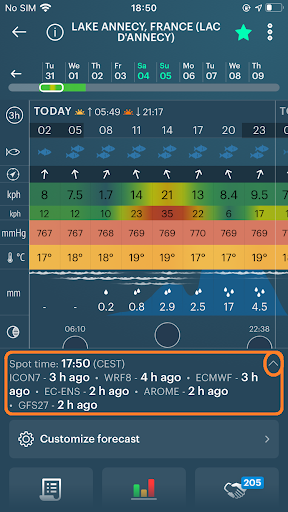
The reference is here — https://windy.app/guide/windy-app-weather-forecast-models.html
-
The forecast looks very strange — 273 C / −100% etc.
Please, contact us at [email protected] with a screenshot illustrating the implausible data.
-
The forecast was inaccurate for my location / area
No forecast is 100% correct, so we provide forecasts from several top-ranked weather models. Apart from access to forecasts from different models, you can use Compare Mode, Weather Station Data and Weather Model Accuracy Rating, Weather Fronts and Isobars.
Here are our videos that will help you become a weather expert:
-
I don’t get a forecast from a particular model
Any spot has the forecast from 3 global models — GFS27, ECMWF and ICON13. Other models cover only certain areas. For example, NAM and HRRR are only available in North America, and AROME only covers France and adjacent territories. Read more about it here
If you’d like us to add forecasts from a weather model that’s not on the list, don’t hesitate to contact us at [email protected].
-
If you need help getting started - check out our tutorial here or contact our user support at [email protected].